Thank you for your interest in
our systems. If you are considering using our software for
your own systems, we recommend the following steps:
Verify your GPS is
compatible
Download the LAS GPS Monitor™
demo -
to make sure that your GPS is compatible with our
software. If your GPS puts out
NMEA-0183 WGS84 coordinate system
data, it will work with our
software. Prove it!
Verify your PC is compatible
Download the LAS Boom Monitor GL™
demo - if
you plan on using one of our boom monitoring packages.
This will show you how the GPS coordinates are used by the
software. Windows Vista is not currently supported.
Trying these demos
will help you to confirm that
your GPS will work and see how the GPS coordinates are used by
our software. If you like what you see, you can purchase
your software here or order
a system.
SOFTWARE FOR GLOBAL USE
LAS GPS Monitor™
and the
LAS TerraRover Rambler™
GPS applications for
laptops and touchscreen PC's. Use our software in your car/truck/jeep
or any other vehicle - large or small. Dashboard GPS units
fall short when there are no roads to follow. These applications are
designed to work anywhere on the planet
- there are no maps other than the ones you make. Try it today!
LAS
GPS
Monitor™
Polling in real-time and updating displays at 500 millisecond intervals, the LAS GPS
Monitor provides a simple yet robust interface for
utilizing GPS coordinate data.
Perfect
for interfacing a GPS to a laptop when you want to avoid
purchasing extra software that is rarely used.
Configurable settings allow the COM port to which the
GPS is connected to be easily selected for data
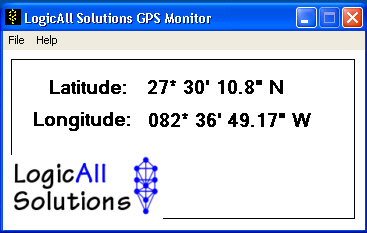
collection. Large text makes this application (shown actual size
below) useful while driving as the user will be able to
read the coordinates at a reasonable viewing distance.
Our LAS GPS Compass is also
included with the download to help you find your way
without high end software required.
LAS
TerraRover Rambler™
Packaged with the LAS GPS
Monitor™
demo is our new application: the
LAS TerraRover Rambler™.
In migrating to a new mapping engine, we developed the
TerraRover Rambler™
to prove out operations in any quadrant of the globe.
When the application starts, you may pick your area of
operations - be it North America, South
America, Europe and Asia, or
Australia. Your quadrant is determined by
where you are in relation to the Equator and the Prime
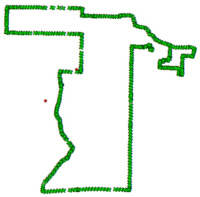
Meridian. Tracking of your position is
automatically enabled when the application starts and
your progress will leave a trail of objects which you
can save by clicking the Save Your Ramble button.
When you are ready to retrace your path, you can load
the Ramble (map) and backtrack. Click
here
to see a screenshot being taken.
Take screenshots of your Ramble and
send them to us! Show us your favorite driving
route on road or off road and we'll put it up for the
world to see. Let us know where you are from as
well! We have added a button which lets you
automatically save screenshots! Your screenshots will be
saved in the C:\TerraRover folder on your hard drive.
Enjoy this free application which requires the LAS GPS
Monitor™
(full or demo version) to read your GPS and have fun
Rambling!
LAS
TerraRover TrailBlazer™
Packaged with the TrailBlazer software suite
are the LAS GPS
Monitor LT™, the
LAS TerraRover TrailBlazer™,
and the LAS Line Builder.
The TrailBlazer delivers the ability to record a
vehicle's progress and location relative to defined waypoints.
Waypoints may be added in real-time as the vehicle travels. When the application starts, you may pick your area of
operations - be it North America, South
America, Europe and Asia, or
Australia. Your quadrant is determined by
where you are in relation to the Equator and the Prime Meridian.
Tracking of your position is automatically enabled when the
application starts and your progress will leave a trail of
objects which you can save by clicking the Save Your Trail
button. Download includes the installation program, a
Getting Started manual, and a user's manual.
LAS
TerraRover Boom Monitor GL™
Packaged with the Boom Monitor GL software suite
are the LAS Dual GPS
Monitor™, the
LAS TerraRover Boom Monitor
GL™ ,
and the LAS Line Builder.
The LAS Boom Monitor™ system is intended for use on vehicles and systems
which have a boom which can be monitored but there is no need to record
weight and/or production information. This system is perfect for
cranes which have "keep out" zones to be aware of. The
zones may be displayed on the screen and the operator can see real-time
where the tip of the boom is in relation to the zones. Operators can also mark the current
position of the boom’s tip and can use this as an additional visual
indicator to set their own limits.
When the application starts, the GPS coordinates
will determine your area of
operations for you - be it North America, South
America, Europe and Asia, or
Australia. Your quadrant is determined by
where you are in relation to the Equator and the Prime Meridian. Download includes the installation program, a
Getting Started manual, and a user's manual. Click
here for more info.
LAS Boom
Monitor™ ~ GL
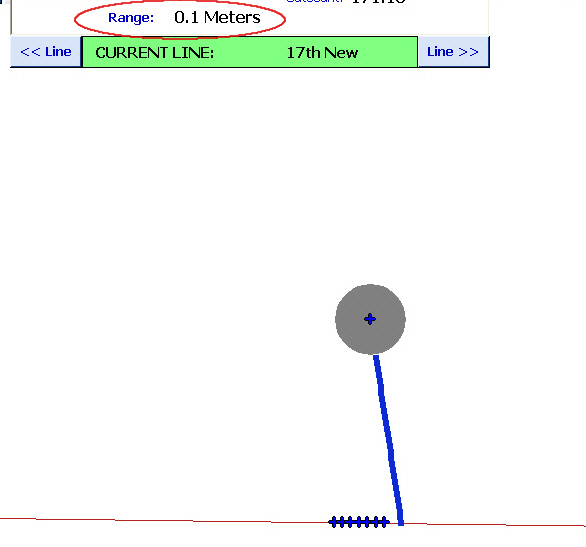
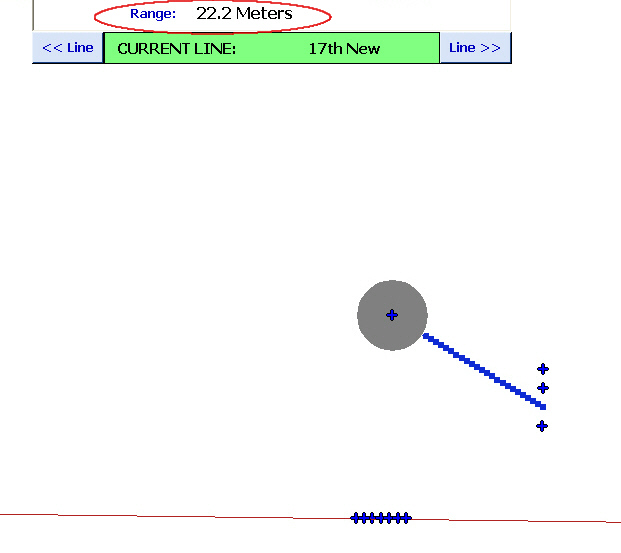
Note the Range/distance from the line to the boom
tip
Click
here to download the LAS Boom
Monitor GL demo.
Download our GPS Monitor and
TrailBlazer demos at any of
the following sites:
FileParade.com

Download.Com

BrotherSoft

www.SoftSoft.ru

OutYard

DownloadTube

FileCluster

FiveSign Network

SuggestSoft

Download25

PadTube

FreeSharewareCenter

SoftPedia

Download3k